
Dingsun HDMI to Component Converter, Convert HDMI Input to Analog YPbPr Video and R/L Audio Signals for Output to TV
Dingsun HDMI to Component Converter, Convert HDMI Input to Analog YPbPr Video and R/L Audio Signals for Output to TV
Description
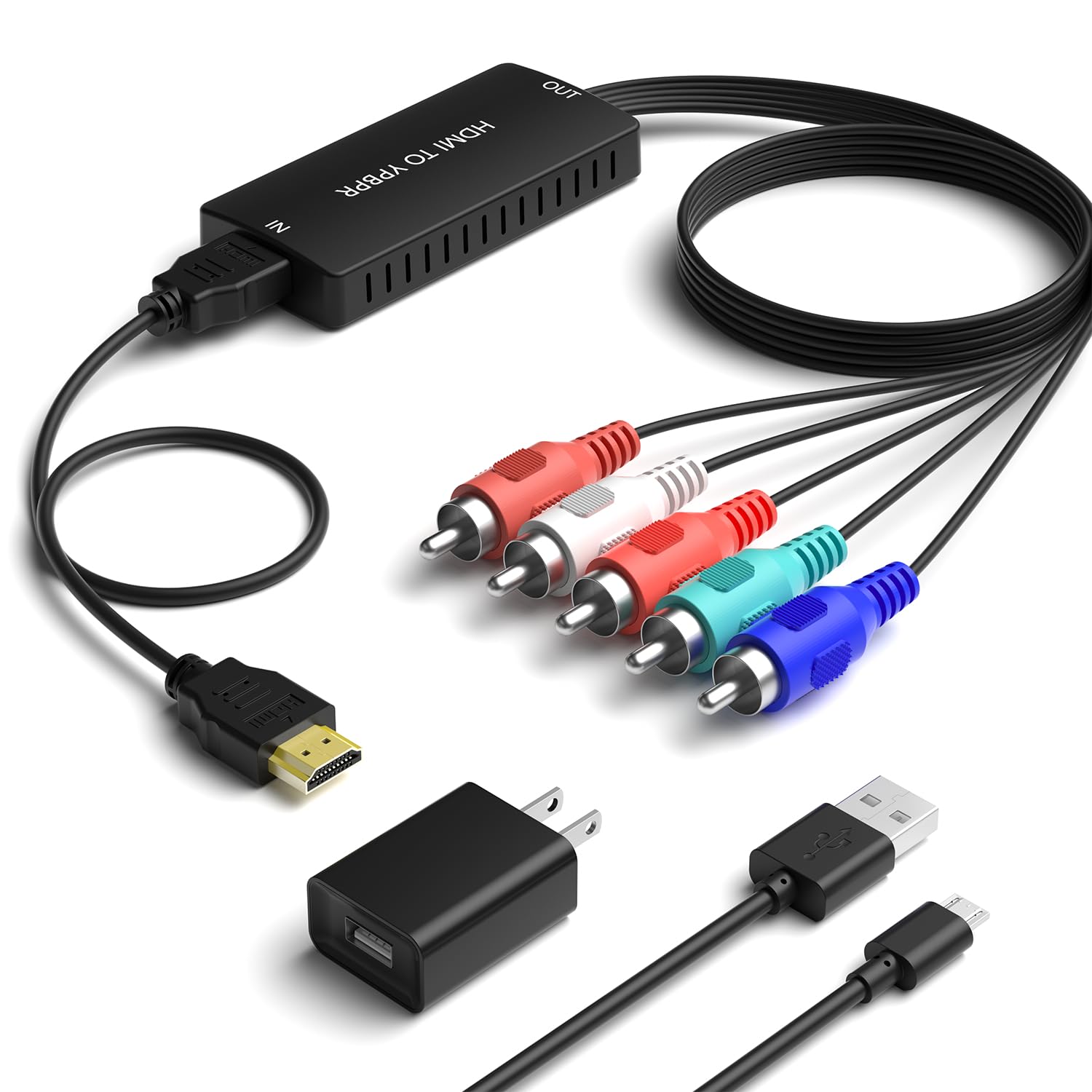
HDMI to Component converter Input Interface: HDMI Output Interface: YPbPr + R / L Audio Function: It is used to convert HDMI input into analog YPbPr video and R/L audio signals for output to TV; YPbPr supports simulta neous/individual output of digital coaxial and R/L stereo audio to amplifiers; HDMI to component converter provides advanced signal processing with great precision, colours, resolutions and details; HDMI video input format: 480i/576i/480p/ 576p/ 720p/ 1080i/ 1080P; YPbPr video output format: 480p@60Hz, 720p@50/60Hz, 1080p@50/60Hz; Input Video Amplifier Bandwidth: 1.65Gpbs/165MHz; Input support: Xbox/ Nintendo Switch/PS3/PS4/PS5/ Apple TV/ Roku/ Fire TV/ STB/ Blu-ray Players/ Game Console / DVD / Notebook and so on Output support: Panasonic Plasma TV, old plasma TV, Toshiba tube TV, Toshiba 51h83 rear projection tv, SONY ,LG and so on If you have any questions about HDMI to component converter, please contact the seller for support at any time. Please NOTE: 1.It does not support 3D and 4K signals. Please set the HDMI signal to 1080i / 720p or below; otherwise, it won't work. Please adjust the HDMI resolution (480p/720p/1080p) when it displays the 8-color banner "IN NO SIGNAL". 2.The color of the "YPbPr" connector should be connected accordingly. Please make sure to insert it correctly; otherwise, it will cause screen abnormalities. Video: Green/Blue/Red. Audio: Red/white. If the sound disappears and the TV screen changes color, replace the red plug. 3.Reverse operation is not supported. This is an HDMI to component converter and cannot be used as a component-to-HDMI converter. 4.The product requires power supply to function properly. Please connect the converter to the power supply (5V1A included in the package). 5.The product comes with a switch. There is a switch on the side of the converter. Please make sure the switch is in the "ON" position when in use. 6.Set the input mode on the TV. The TV has multiple input modes. After connecting the product, please set the TV input mode to "YPbPr". 7.Poor picture quality. It is only used for the conversion between video formats and will not change the video quality or increase the video resolution. 8.Please confirm whether the signal source is turned on and working properly when in use. 9.There is a black border in the picture. Due to the different formats of some TVS and signal sources, if you cannot accept it, please contact customer service for a return. Attention When using Apple TV, if all connections are correct but there is no video or sound, please set the resolution to 720P. When using the Fire stick, if all connections are correct but the Fire stick keeps restarting or is unstable, please replace the power supply for the Fire stick. When using PS, please pay attention to setting the output mode of PS.
Item Details
Seller

Legacy Bids
Pickup Location
3591 John Peter Lee St
North Las Vegas, NV, 89032
Quality
Estimated Retail Price
$23.99
Buyers Premium
15%
Inventory Number
1056211352
Found in
Additional Details from the Manufacturer
This item information is coming from the manufacturer. Some of the details may vary from the Nellis Auction listing. Please check the Quality Rating and Notes for information specific to this listing
brand
Dingsuncolor
Greenweight
0.20 lbsMore features
- Input Interface: HDMI
- Output Interface: YPbPr + R / L Audio
- YPbPr supports simulta neous/individual output of digital coaxial and R/L stereo audio to amplifiers;
- HDMI Input support: Apple TV/ Roku/ Fire TV/ STB/ Blu-ray Players/ Game Console / DVD and so on.
- The maximum resolution of this converter is 1080P and it does not support 3D and 4K signals. You need to lower the resolution of the signal source.
- This is an HDMI to component converter and cannot be used as a component-to-HDMI converter.
- HDMI to component converter provides advanced signal processing with great precision, colours, resolutions and details;
- The product requires power supply to function properly.
- It is only used for the conversion between video formats and will not change the video quality or increase the video resolution.
See the deals
Get in on the action, thousands of new items added daily. Bid and win!
Start bidding now