
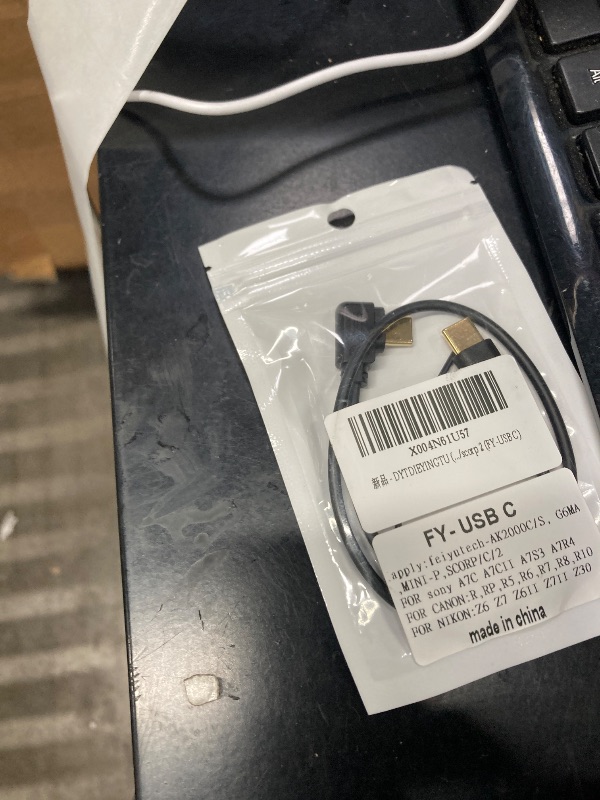
(Type c to Type c) Feiyu Technology Stabilizer Release Cable for Camera Multi-Function Data Cable for Sony,/for Canon,/for Nikon Cameras to feiyu scorp/c/min/scorp 2 (FY-USB C)
(Type c to Type c) Feiyu Technology Stabilizer Release Cable for Camera Multi-Function Data Cable for Sony,/for Canon,/for Nikon Cameras to feiyu scorp/c/min/scorp 2 (FY-USB C)

Description
type c to type c Feiyu Stabilizer camera control cable 1) Applicable stabilizer: feiyu(scorp,scorp c,scorp mini,scorp Mini-p,scorp 2,ak2000s,ak2000c,G6MAX) 2) Supported camera model: 001) for sony:A7R4,A7R5,A7m4,A7C,A7C II,A7CR,A7S3,ZV-E1,ZV-E10,ZV-1M2,A6700,FX3 III,A6000,A6300,A6400,A6500,DSC-RX100M3,DSC-RX100M4,DSC-RX100M5 002)for canon:EOS(R,RP,M6 Mark II,G7 X Mark III,R6,R6 Mark II,R7,R8,R10,R50) 003) for nikon:Z fc,Z6,Z6 II,Z7,Z7 II,Z5,Z30,Z F. (Take photos, video, view gallery) Adjustment parameter value is not supported 3) Support control functions: the same function as the original cable, photography, video, adjustable parameters (ISO, aperture, shutter), some cameras do not support adjustment parameters, please see the original website description. 4) The camera jack of the stabilizer is a Type-c usb port, placed on the stabilizer pitch shaft (near the bracket that locks the camera). 5) Use of FY stabilizer touch screen: in the startup state, 01- Swipe left with your hand to set basic functions. 02- Swipe right to set" Aperture, ISO, shutter" Parameters. 03- Swipe up to set the shutter function of "FY Big Wheel". 6) The red dot button on the stabilizer is used: 01- half press and do not let go to control the camera focus. 02- Press down to hold still for 3 seconds to control the camera to take a picture. 03- Press down on the bottom to quickly release and control camera recording. A)for Canon camera connection note: 1. Control the camera When taking photos, please manually set the camera mode to the photo gear. When controlling the recording, switch the camera shooting mode to the video file 2. When using USB focus, unplug the lens to "MF" file B)for SONY camera connection note: 1. Turn off the Control with Smartphone function on the camera. The specific setting method is as follows: Select menu -> Network -> Control with a smartphone -> Select "Close" . 2. Set the "USB Connection" function of the camera to "Computer Remote control" . The specific setting method is as follows: Select menu -> Select "Settings" -> Select "USB Connection" -> Select "Computer Remote Control" . 3. Set remote shooting in the camera to "Shoot only device", the specific setting method is as follows: menu > Network > Transmission/Remote > Computer remote control function > Still image save destination > Camera only device 4. Please set the mode disc on the camera to "M"". Gear position.
Item Details
Seller

Nellis Auction
Pickup Location
400 Delran Pkwy
Delran, NJ, 8075
Quality
Estimated Retail Price
$17.95
Buyers Premium
15%
Inventory Number
1068010931
Additional Details from the Manufacturer
This item information is coming from the manufacturer. Some of the details may vary from the Nellis Auction listing. Please check the Quality Rating and Notes for information specific to this listing
brand
DYTDIEYINGTUweight
0.04 lbsMore features
- Applicable stabilizer: feiyu(scorp,scorp c,scorp mini,scorp Mini-p,scorp 2,ak2000s,ak2000c,G6MAX)
- Support control functions: the same function as the original cable, photography, video, adjustable parameters (ISO, aperture, shutter), some cameras do not support adjustment parameters, please see the original website description
- The red dot button on the stabilizer is used: 01- half press and do not let go to control the camera focus. 02- Press down to hold still for 3 seconds to control the camera to take a picture. 03- Press down on the bottom to quickly release and control camera recording
- Use of FY Stabilizer touch display: in the startup state, 01- Swipe left with your hand to set basic functions. 02- Swipe right to set" Aperture, ISO, shutter" Parameters. 03- Swipe up to set the shutter function of "FY Big Wheel"
- In order to be more compatible with the functions of the camera, please visit the official website in time to inquire and update the new stabilizer software

See the deals
Get in on the action, thousands of new items added daily. Bid and win!
Start bidding now